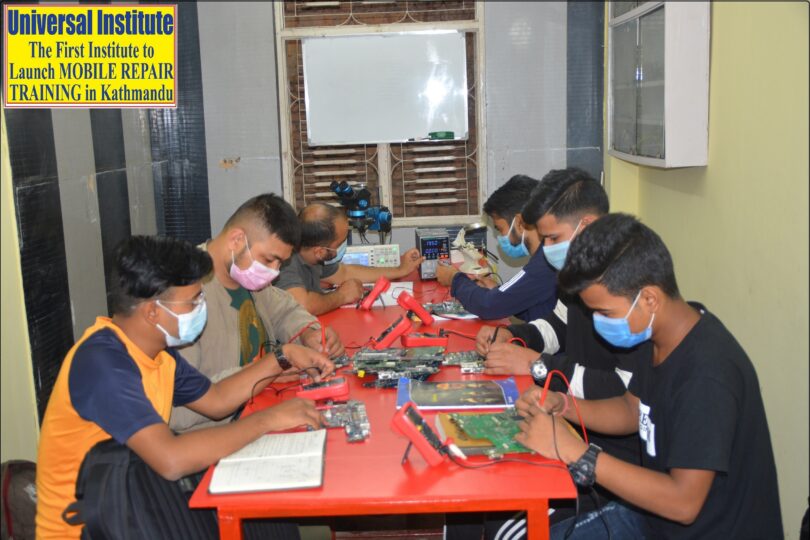
Laptop Repair Training
Computer-Laptop Repair Course is designed to teach both basic and advanced skills required to diagnose and fix laptop hardware and software problems. At universal Institute, the syllabus for Computer-Laptop Repair Course is divided into 3 Levels. The program covers all the topics that are necessary to learn for repairing and servicing mobile phones. Here’s what it typically contains:
Computer-Laptop Card Level Training (Level one)
Introduction to Computer-Laptop hardware and components
- Current (AC/DC/AMPS)
- Frequency, Signal & Pulse
- All Brands Laptop Assembling Process & De-assembling Process
- Introduction to desktop/laptops Generations
- Desktop/Laptops Major Parts and their functions
Tools & Equipment Training (How to Use and Read)
- Multimeter
- DC Power Supply
- Soldering iron
- Soldering and Desoldering Tools
- Laptop Opening Tools and Tweezers
Basic Fault finding, troubleshooting various faults
- Display, back Glass replacement & housing replacement
- Battery, charging, and power problems troubleshooting
- Cleaning and Washing Process of Laptop Motherboard
- Fixing Broken or Damaged ones (Casing, Hinge……. etc.)
- DC Jack & Other Connector Repair and Replacement Process
Test and Check up Procedures on Components
- How to Test Battery, charger, speaker, LVDS Cable, SMPS..
- How to test Charger Voltage
- How to check ON OFF Switch…
- How to Fix Charging Problems, Won’t Charge, Slow Charge, Boot Loop, etc
Practical Training
- How to Solder & De-solder Different IC In Laptop Mother Board.
- Use of Soldering Iron, Hot Glue Gun/Heat Gun
- Use of Multi Meter: Analog & Digital
- DC Jack & Other Connector Repair and Replacement Process
Note: In this first level of Computer-Laptop training student will replace all the internal and external parts of different models of Computer- laptop. Students can easily fix Cover, Battery, Display, Web camera, Hings, LVDS Cable(data cable), Keyboard, Touchpad, DVD ROM, Hard disk, SMPS power supply, Motherboard, RAM Card, WI-FI Card, Processer(CPU), Colling Fan, Colling System, Speaker, BIOS Battery.. … etc.
Computer-Laptop Intermediate Level Training (Level Two)
Introduction to Mobile Phone hardware and components
- Basic Electronics
- Ohm’s Law
- Identifying Electronics Components and Circuit Symbols
- Resistors ,Capacitors, Transistors, Diodes ,Inductors ,Crystal Oscillators, and Filters,
- Testing of various parts and components by Digital multi meter
- Study of different ICs (chips) used in Motherboard
- Symbol of electronic parts
- Block Diagram of Motherboard
Tools and Test Equipment
- Test and Check up Procedures on Electronics Components
- SMD Rework Stations, DC Power Supply
- Working Table Equipment
- Use of Hot Air Gun & Soldering Iron
- Chemicals used in soldering (flux, lead, solder wire, flux remover, tin
Theory & practical
- Soldering & disordering of components by using a soldering iron
- Laptop Mother Board Reading (Which company made it)
- Laptop Block Diagram Concept
- Differences between INTEL Motherboard and AMD Motherboard
- How to identify CPU, GMCH, ICH, PCH, SIO, BIOS, Clock, Crystal and Musk, Chip, etc.
- Docking, PCI, Mini Card etc. Connector Identifying
- LAN & AUDIO Chip Identifying
Computer-Laptop Chip Level Training (Level Three)
Tools and Test Equipment
- Use of LCR Meter (Capacitance & Inductance)
- Use of Frequency Counter (Measuring Clock signals & Crystal)
- Use of Oscilloscope, frequency counter, CRO, BGA Machine…)
Theory & Practical
- Understanding Laptop Schematic Diagram & Board View
- Understanding Different IC’s Datasheet
- Various Section of ICH / PCH Controller & Connector
- Various Sections of GMCH Controller & Connector
- Use of Debug Card (Laptop & Desktop)
- Use of CPU, RAM Slot & LCD/LED tester
- Understanding Main BIOS & EC BIOS
- Use of BIOS Programmer
- Understanding Data bus, Address Bus & Control Bus.
- Understanding BUS Line: FSB, DMI, PCI, PCIE, LPC & SPI BUS Interface.
- Reheating and mounting of various BGA and SMD chips
Schematic Diagrams
- Downloading Motherboard schematics diagram
- Downloading Motherboard chip datasheet
- Identifying Component Symbols and Layout in Schematic Diagram
- Integrated Circuit Symbols and Layout
- How to Read mobile laptop’s Schematic Diagrams
- Advanced motherboard analysis and circuit tracing
Troubleshooting & Fixing
- Common repair procedure for hardware related faults
- Power failure (Dead), charging, display/heating problem …..
- Troubleshooting through circuit diagrams.
- Advanced troubleshooting techniques
Professional Skills
- Clearing of all previous doubts
- Guidance to start and manage your own repair center.
- Guidance to successfully work as a technician.
- Procuring tools, spare parts and accessories.
- Dealing with customers and distributors.
- Marketing your repair business
- Workshop setup
- Safety procedures (ESD protection, electrical safety
Troubleshooting various faults
- Battery Charger Fault Finding
- Primary Voltage Missing: Laptop do not power up
- Secondary Voltage Missing: Laptop Power up but no display
- System IC Section / 5v-3v IC Fault Finding
- Memory Section / Memory Chip Fault Finding
- South Bridge ICH/ PCH/ FCH/ MCP Chip Fault Finding
- Graphics Chip (NVidia, ATI etc.) Fault Finding
- CPU not working Fault Finding
- VGA & LVDS Signal and Musk Chip Fault Finding
- Web Camera does not work
- System Fan , Heat pipe failure
- Keyboard, Touch Pad does not work
- Dim Display (Hardly see windows): Inverter or Back light Failure
- Laptop Open but Shutdown Immediately
- Laptop Randomly Restart
- Power Button does not Work
- Head Phone & Micro Phone do not work
- Internal Speakers do not work
- Battery is not recognized by windows
- Battery Indicator shows Low Signal
- Laptop Over Heating or Thermal Fault Finding
- Clock Chip don’t Release Clock Signals
Advantages for Students:
- All Lectures of Laptop & Desktop Chip Level Training are Explained Step By Step Practically with the Help of Schematic Diagrams and Laptop & Desktop Mother Board.
- Professional & Experienced Staff who are trained by Dubai & Indian laptop Service Engineering Institute (Online) and They Gives Students Quality Teaching.
- Our Teacher Spatially Care for Individual Attention for Each Students.
- We Will Teach All You Need to Know About Fixing Laptop & Desktop Professionally.
- All Courses at Universal are Highly Practical Knowledge Oriented.
- We Use World Class Laptop Repair Tools Like BGA Machine, Pre heater, Oscilloscope, Frequency Counter, BIOS Programmer, Debug Card, CPU & RAM Tester etc.
- Student Gets Free Video Tutorials, Special Notes (Card level & Chip Level) , Certificate And Many More.
- Student Gets Life Time Support for Technical Help, Schematic Diagrams, BIOS file or any other Help through our “UNIVERSAL LAPTOP REPAIR FORUM” Private Laptop Repair forum.
Course Duration: Regular Course-90 Days & Short Course-45 Days
Training Time: 2 Hours Per day(Theory + Practical)
Language of instruction:Nepali/Hindi/English
Eligibility Criteria: 8 to 10th Class(At Least Completed Grade 8)
Group structure: 6 Participants Per Group
New classes starts on: 1st,10th and 20th(Every Month)







